 SeedBase
Generate test data in your JetBrains IDE
A plugin for IntelliJ IDEA, PyCharm, DataGrip and the rest of the JetBrains family. Generate realistic, foreign-key-consistent data from your schema, data that actually looks real (not "Premium Widget 1" and lorem ipsum), pull it as SQL, CSV or JSON, and push a schema straight from the IDE. No throwaway seed scripts, no rows that break on the first constraint.
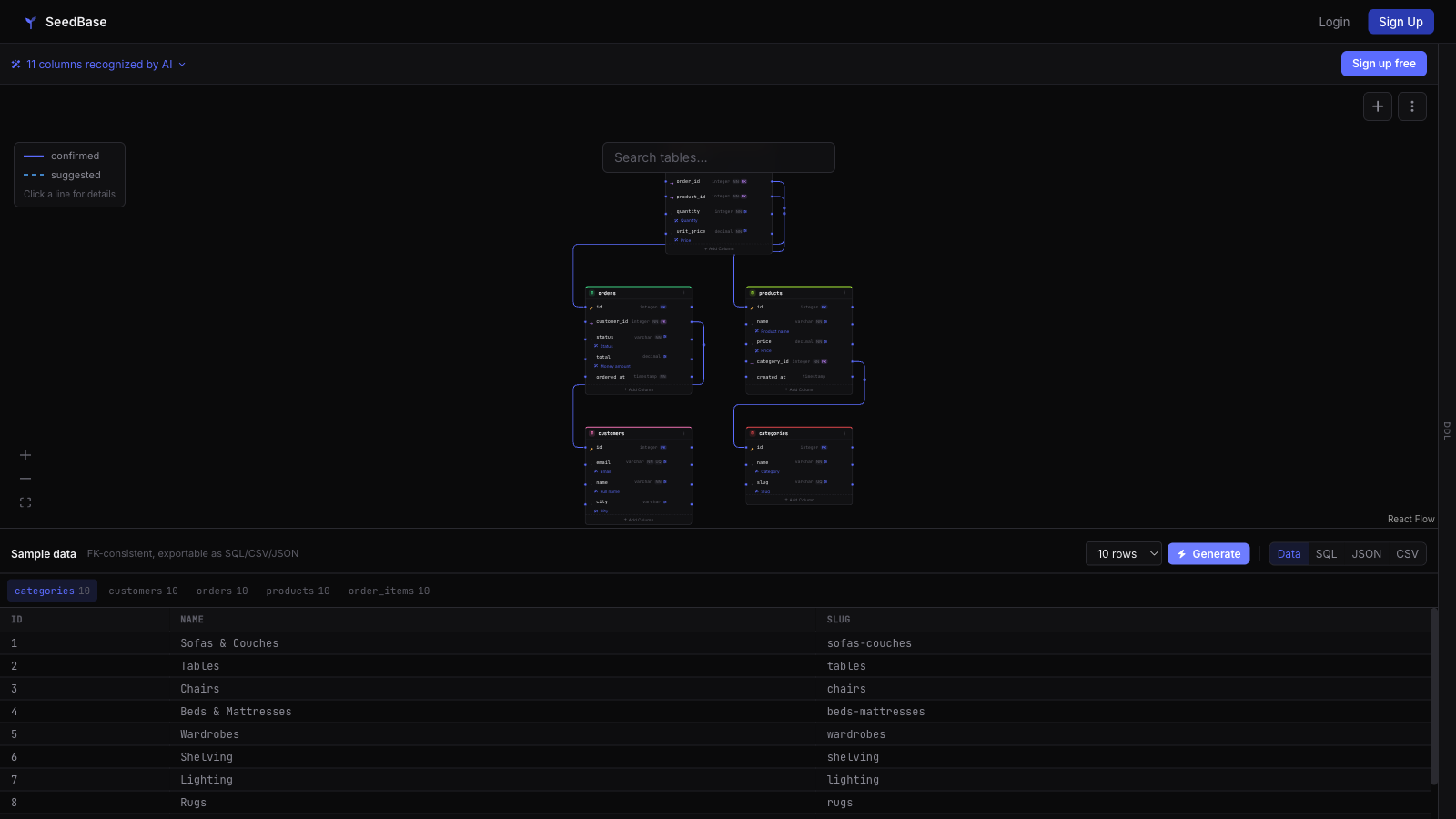
Want to see the output before installing? Try the login-free sandbox: paste a schema, generate, look at the rows.
Why generate test data inside the IDE
- Stay where you work: a tool window next to your project, not a separate web tab.
- The data is foreign-key-consistent: every reference resolves, so it loads into Postgres or MySQL with constraints enabled.
- Push a schema from the IDE, including Django
models.py, with a detect preview before anything is sent.
Everything the tool window can do
Right-click a project or a generation in the SeedBase tool window. The toolbar keeps a few global actions; everything project- or generation-specific lives in the context menu.
Projects
- New Project from Schema — turn a workspace
.sqldump, Djangomodels.pyor a Prisma schema into a SeedBase project. The database type is detected automatically, you pick which tables to send, and very large SQL dumps are streamed (only the DDL is read). - Push Schema — update an existing project from your schema files, with a checkbox table picker (select all / none) so you send only the tables you need.
- Generate Data — build a foreign-key-consistent dataset from the schema.
- Preview Data — see sample rows in a sortable table right inside the IDE, no download, switch between tables.
- Insert Test Data at Caret — drop FK-consistent sample rows into the open file, formatted for the file type (SQL
INSERTs, PHP/Python arrays or JSON). - Mock API — serve the project's data as a live read-only REST API. The action is status-aware: enable it, open the built-in Swagger Explorer in your browser, copy the base URL, rebuild the data or disable it.
- Upload OpenAPI — bring your own OpenAPI/Swagger file and SeedBase serves exactly your endpoints with FK-consistent, realistic data.
- Push to Database, Reset & Reseed and Seed Test Data — load the generated data into a database connection you configured on seedbase.dev (drop & recreate, truncate or append), reset a database to fresh data, or generate and load in one step. Pro/Team.
- Open in Browser — jump to the project's schema page.
Generations
- Pull Data — download a completed generation as SQL, CSV or JSON.
- Push to Database — same load-into-DB action from a specific generation.
- Delete Generation — remove a generation (with confirmation).
Sign-in is browser-based; the token is stored in the IDE's PasswordSafe, never in plain text.
Install
- JetBrains Marketplace — or, inside the IDE, open
Settings → Plugins → Marketplaceand search "SeedBase". - One install covers IntelliJ IDEA, PyCharm, WebStorm, GoLand, PhpStorm, RubyMine, Rider and DataGrip.
From schema to data in four steps
- Open the SeedBase tool window and sign in. Credentials are stored in the IDE's PasswordSafe, not in plain text.
- Optionally push a schema from the project (for example Django
models.py); a detect preview shows what will be sent, then you confirm. - Pick a project and run Generate. SeedBase builds a foreign-key-consistent dataset from that schema.
- Pull the result as SQL, CSV or JSON and load it into your dev database or fixtures.
Your account, projects and row limits match what you see at seedbase.dev. You can also build schemas there from a SQL dump or a Prisma schema and drive generation from the IDE.
Works with your stack
- IDEs: every JetBrains IDE. Prefer VS Code or Cursor? There is a VS Code extension too.
- Databases: PostgreSQL, MySQL, MariaDB, SQLite, SQL Server. Export SQL, CSV or JSON; Pro pushes straight into the database.
- Schemas: import from a SQL dump, Django models, a Prisma schema, or a live connection.
Generate real test data without leaving your IDE.
Install the plugin, sign in once, and pull foreign-key-consistent SQL, CSV or JSON straight into your project. Free tier, no card.
Create a free accountMore: VS Code extension · For AI agents · Django test data · Docs · home