 SeedBase
Django test data, generated from your models.py
Hand-written Django fixtures and factory_boy factories rot the moment you run a migration, and copying a production dump into your test suite is a GDPR problem waiting to happen. The fix: SeedBase reads your models.py and generates realistic, foreign-key-consistent data that actually looks real, not "Premium Widget 1" and lorem ipsum. Pull a seed.sql with the seedbase CLI, load it with a management command, or inject it through the pytest plugin. One generation seeds a whole test database.
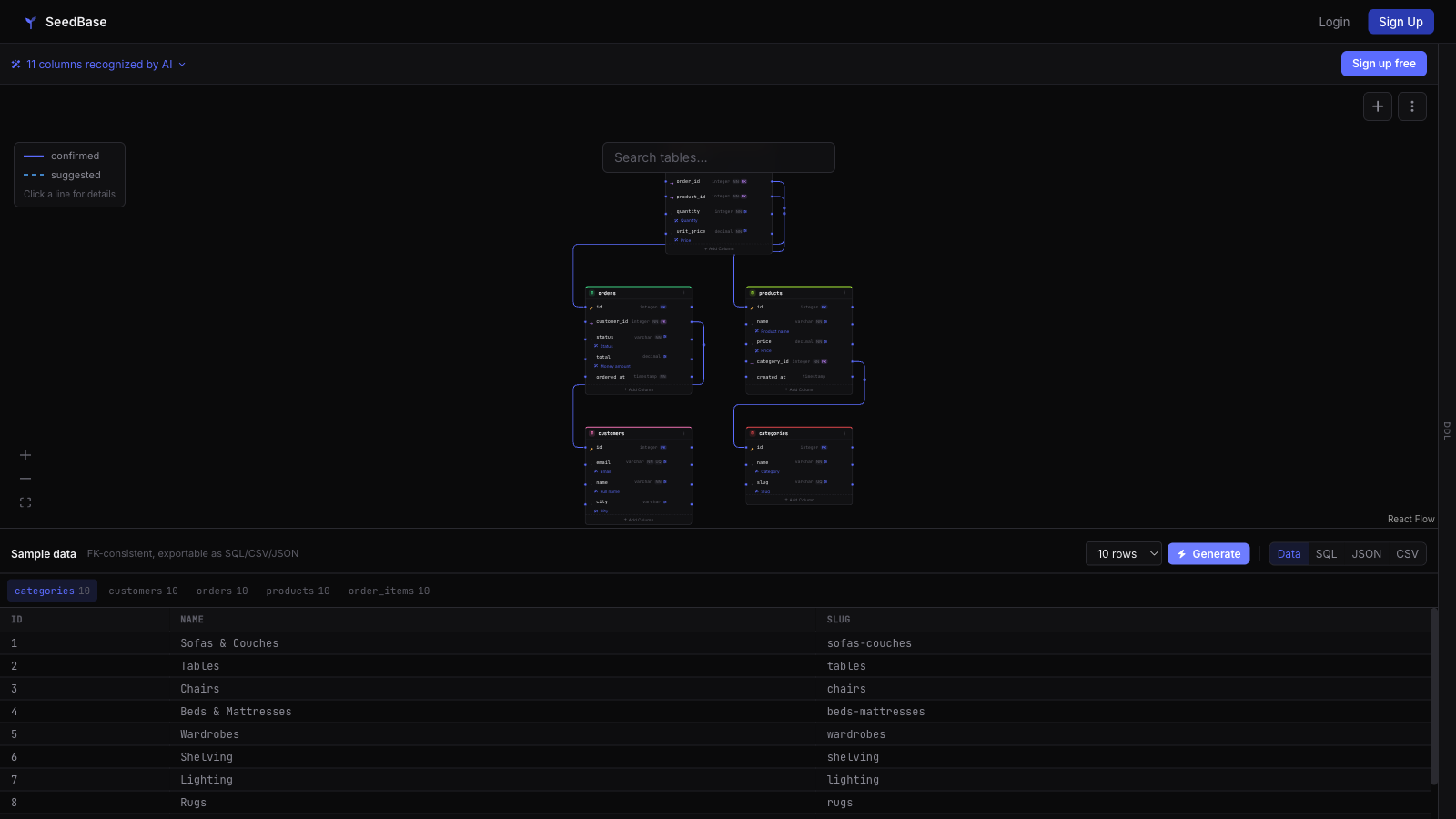
Free tier, no card. Want to see the output before wiring anything up? Try the login-free sandbox: paste a schema, generate, look at the rows. For the longer walkthrough of the model parser and the FK handling, read the in-depth Django guide.
See also: in-depth Django guide · Symfony test data · SQL test data
From models.py to a populated test database
A handful of Django fixtures is fine. A real project is not. Once you have dozens of models, every factory has to know which parent rows exist, which foreign keys to satisfy, and which derived totals to keep in sync. You end up maintaining a second, worse copy of your schema in test code, and it breaks on the next migration.
SeedBase reads your models.py instead. It walks the model graph, resolves the foreign keys, and fills a whole foreign-key-consistent database with realistic distributions. One generation, one fixture, and your test gets a database that looks like production without being production.
- Every
customer_idpoints at a customer that exists, so the data loads with constraints on. - Realistic distributions and values, not "Premium Widget 1", so your assertions test against data that looks real.
- One fixture replaces the pile of per-model factory_boy factories and the wiring between them.
- No production data leaves the building, so there is no GDPR exposure in the test suite.
Seed a Django test database in pytest
A pytest fixture is just dependency injection: the test declares what it needs in its arguments and the framework provides it. So inject the whole database.
# tests/test_orders.py
def test_pagination(seeded_database):
    # a live connection to a DB full of realistic, FK-consistent data
    rows = seeded_database.execute(
        sqlalchemy.text("SELECT email FROM users LIMIT 5")
    ).fetchall()
    assert all("@" in e for (e,) in rows)
Install with pip install "seedbase[database]". The seeded_database fixture loads a generation into a live database and hands you the connection. Prefer no database at all? The seeded_rows fixture returns {table: [rows]} as an in-memory dict, so you assert against the rows directly. It plays alongside pytest-django, and it is an alternative to loaddata and factory_boy when you want a whole populated database rather than a handful of objects.
Generate Django test data from the command line
If you would rather have a file on disk than a fixture, the seedbase CLI pulls a foreign-key-consistent seed.sql straight from the project you imported. No SQL to write, no factories to maintain, just the schema you already have.
# pip install seedbase
seedbase login

# the project id was created when you imported models.py (or a live DB URL)
seedbase pull <project-id> --to-file seed.sql
The output is plain SQL with INSERT statements emitted in topological foreign-key order, so every customer_id resolves to a customer that already exists. Pass a seed to make the pull deterministic, so the same command produces the same seed.sql on every machine. Exact flags and the full command reference live in the docs. For PostgreSQL and MySQL specifics, see the SQL test data guide.
Load Django test data with a management command
Because the pull is a regular SQL file, you load it the way you load any seed: through your database client, or through a tiny Django management command that runs the file inside a transaction. This is the bulk-data alternative to loaddata and a pile of JSON fixtures.
# yourapp/management/commands/seed_testdata.py
from pathlib import Path
from django.core.management.base import BaseCommand
from django.db import connection, transaction

class Command(BaseCommand):
    help = "Load the SeedBase-generated seed.sql into the current database"

    def handle(self, *args, **options):
        sql = Path("seed.sql").read_text()
        with transaction.atomic(), connection.cursor() as cur:
            cur.execute(sql)
        self.stdout.write(self.style.SUCCESS("Seeded test data"))
Then python manage.py seed_testdata fills the whole database in one shot. Because the inserts respect dependency order, the file loads with foreign keys enabled and nothing references a row that does not exist yet. Re-run the CLI pull whenever a migration changes the schema, the generation tracks the models instead of drifting from them.
Django test data without writing factory_boy factories
A handful of factories is fine. A real suite is a second, hand-maintained copy of your schema. factory_boy and Faker stay the right tool for building a single object inside one test, where you want explicit control over a couple of fields. SeedBase covers the other case: a whole referentially intact database for dev, staging, demos and CI, generated from the models so it never falls behind a migration.
- No per-model factory and no
SubFactorywiring: the FK graph is resolved from the schema, not declared by hand. - Realistic distributions instead of identical rows, so pagination and N+1 bugs surface where they actually live.
- One generation feeds a SQL file, a pytest fixture, and a direct database push from the same project.
If you are weighing the library route head on, the SeedBase vs Faker comparison lays out where each one fits.
Reads real Django projects
Toy schemas are easy. The hard part is the patterns a real Django codebase actually uses, and that is what SeedBase was built against.
- Abstract mixins: a
TimeStampedModelbase withcreated_atandupdated_atinherited across half your models. - Model inheritance: concrete and abstract bases resolved into the right tables.
ForeignKey("self"): self-referential trees and graphs, like a category that has a parent category.- Implicit
idprimary keys: the auto-addedidfield that never shows up in models.py but is real in the database.
SeedBase was tested against a real 20-app Django project with 226 tables, including abstract mixins and ForeignKey("self"). That is where the foreign-key handling and the edge cases came from, not from a tidy three-table demo.
Deterministic and reproducible
Generation is seeded. The same seed produces the same data, every run. That keeps CI reproducible: the same fixture yields the same rows on every machine, so a green build stays green for the right reason. When a test fails, reuse the seed and you reproduce the exact dataset that broke it, instead of chasing a fixture that has since been hand-edited.
Free tier: generate, download, seed
Generation and JSON download are free to use. You do not need push-to-database or any paid feature to seed a Django test database, because the data loads through your own database connection or as plain rows in memory. Generate once, download the JSON, and let your fixture wire it into the test setup.
ForeignKey("self"), that is where the foreign-key and edge-case handling came from. EU-hosted, no third-party trackers, and you can export everything, so nothing is locked in.Try it
There is a runnable example, so you can clone, run the test, and watch a real FK-consistent dataset get seeded into a Django test database. Then point it at your own models.
- Clone the runnable example under
examples/pytest/, run the test, and watch the fixture seed a live database. - Paste a schema and look at the rows in the login-free sandbox, no account needed.
- Drive generation from your editor with the VS Code extension or the JetBrains plugin.
- Read the docs for the pytest fixtures and the model-reading details, or the in-depth Django guide for the parser and FK walkthrough.
- On another stack? See the Symfony test data and Laravel test data guides, or the test data fixtures hub.
Stop hand-maintaining Django fixtures.
Generate a foreign-key-consistent dataset from your models.py once and seed it into your pytest tests. Free tier, no card.
Create a free accountMore: login-free sandbox · VS Code · Fixtures hub · Docs · home
Frequently asked questions
Is it free?
Yes. Generation, SQL, CSV and JSON export are part of the free tier with no credit card, so you can pull a foreign-key-consistent dataset from your Django models and load it into your tests at no cost. Paid plans start at 19 euro per month and add direct database push and higher row limits, but you do not need any of that to seed a Django test database.
How do I generate Django test data from the command line?
Install the Python package with pip install seedbase, run seedbase login once, then seedbase pull with your project id to write a foreign-key-consistent seed.sql to disk. The project is created when you import your models.py or point SeedBase at a live database. The exact flags live in the docs.
How is this different from factory_boy or Faker?
factory_boy and Faker generate objects or values one field at a time and you still wire up every factory and relationship by hand. SeedBase reads your schema and fills a whole foreign-key-consistent database with realistic distributions, so an order that points at a customer actually has a customer to point at and the values look real instead of "Premium Widget 1" or lorem ipsum. factory_boy stays a good fit for building a single object inside a test.
Does it read my models.py?
Yes. SeedBase reads a Django models.py including abstract mixins and model inheritance, ForeignKey("self") self-references, and implicit id primary keys. It also reads a SQL dump or a live database connection, so you can point it at whichever representation of the schema you already have.
Can I load the data with a Django management command?
Yes. SeedBase writes a plain seed.sql with INSERT statements in topological foreign-key order, so it loads through your database client or a small management command that runs the file inside a transaction. Because the inserts respect dependency order, the data loads into a constrained schema with foreign keys enabled, no reordering needed.
Is it deterministic?
Yes. Generation is seeded, so the same seed produces the same data every run. That makes CI reproducible: the same fixture yields the same rows, and a failing test can be reproduced exactly by reusing the seed. A pinned reference_date keeps timestamps reproducible too, so date-window queries return the same range across runs.
Does it work with pytest-django?
Yes. The seeded_database fixture loads a generation into a live database and hands your test a connection, and it plays alongside pytest-django. If you do not want a database at all, the seeded_rows fixture returns the data as an in-memory dict of table to list of rows. It is an alternative to loaddata and factory_boy for a whole populated database.